Google Consent Mode v2 in brief
Google Consent Mode v2 uses four signals to communicate consent choices to Google. Basic and advanced modes differ in when tags load and what data is sent.
Google Consent Mode v2 uses four signals to communicate consent choices to Google. Basic and advanced modes differ in when tags load and what data is sent.
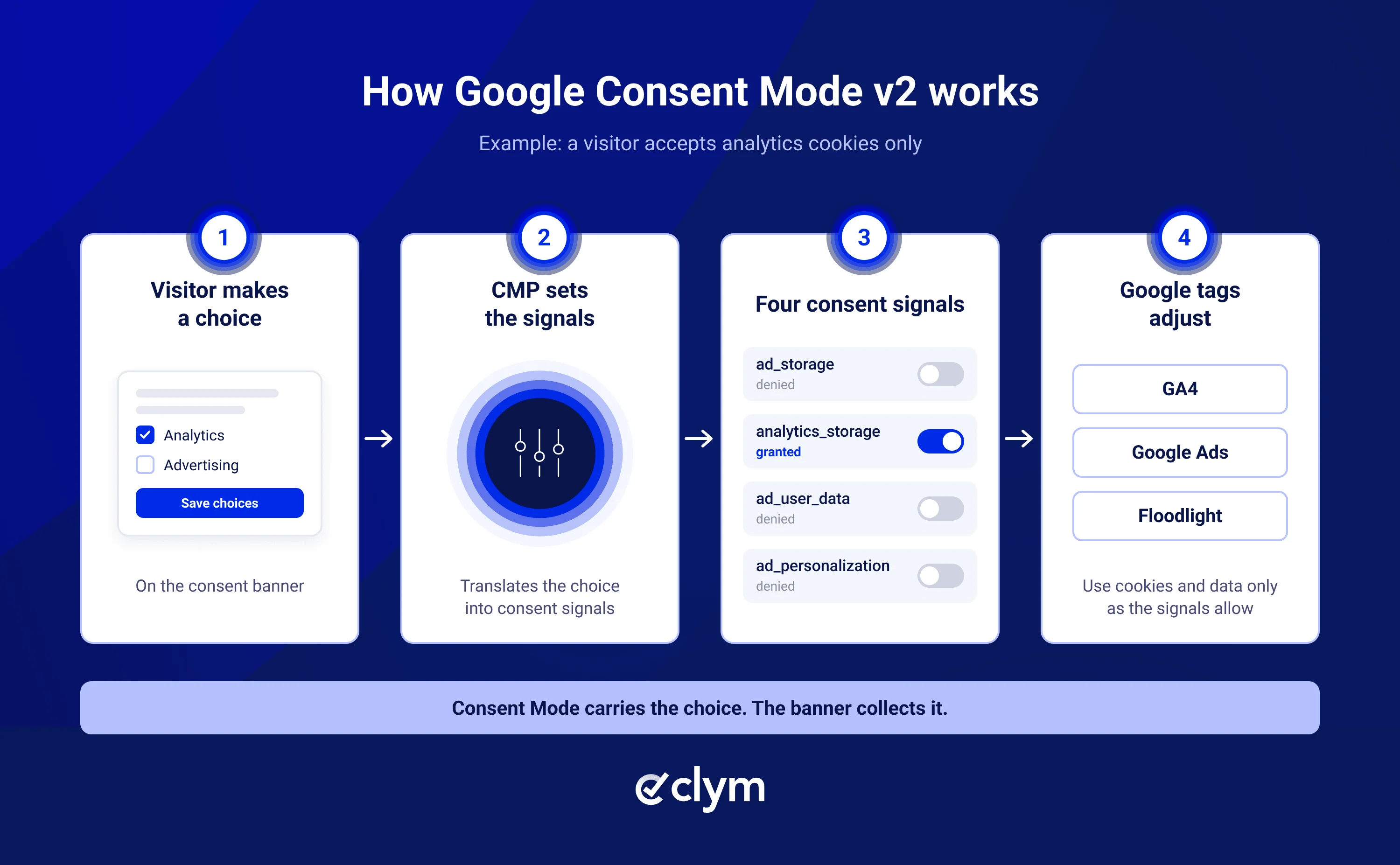
Your consent banner collects each visitor’s choice, and Google Consent Mode v2 communicates that choice to Google tags through four consent signals. These signals help control how Google Analytics 4 (GA4) and Google Ads use cookies and process data for measurement and advertising.
If you advertise with Google and have visitors in the European Economic Area (EEA), the UK or Switzerland, Google expects these signals. Setting them up by hand means editing tag code and keeping it in sync with your banner. A consent management platform (CMP) like Clym can configure it for you instead.
Question | Short answer |
|---|---|
What is it? | A Google framework that communicates visitors’ consent choices to Google tags |
Who needs it? | Websites using Google Ads or GA4 advertising features with visitors in the EEA, the UK or Switzerland |
What changed in v2? | Two new signals: ad_user_data and ad_personalization |
Basic or advanced? | Basic loads Google tags only after consent. Advanced loads them right away and sends cookieless pings until the visitor consents |
Easiest way to set it up? | A CMP that configures Consent Mode for you, such as Clym |
How do you check it? | With Clym Pulse, Google Tag Assistant and the Diagnostics tab in Google Ads |
It’s a Google framework, not a banner: it doesn’t ask for consent, as Google’s help page points out. Your banner asks, and Consent Mode carries the answer to Google tags so they can adjust their behavior.
Version 2 arrived in November 2023 and added two advertising signals to the original two. Each signal is set to granted or denied, as described in Google’s consent mode overview:
Signal | What it covers | When it is denied |
|---|---|---|
ad_storage | Advertising cookies and identifiers | Google Ads cookies are not set or read |
analytics_storage | Cookies used for analytics and measurement | GA4 does not set its cookies |
ad_user_data | Sending user data to Google for advertising | User data is not sent to Google for ad purposes |
ad_personalization | Using data for personalized advertising | Data can’t be used for personalized ads, such as remarketing |
Yes, if you use Google advertising or measurement features with visitors in the EEA, the UK or Switzerland. Google’s EU user consent policy requires advertisers to pass on their visitors’ consent, and in early 2024 Google asked advertisers to send v2 signals to keep its audience and measurement features working for EEA traffic. That applies wherever your business is based.
Without the appropriate consent signals, advertisers may lose access to certain audience and measurement capabilities for affected visitors. This can reduce the data available for remarketing, conversion reporting, and automated bidding. For reporting, see how consent affects your GA4 and Google Ads data.
Consent Mode doesn’t replace consent under the GDPR. You still need a banner that collects valid consent; our GDPR cookie consent checklist covers what that involves, and our GDPR compliance guide covers the regulation as a whole.
The difference is what Google receives from visitors who decline. In basic mode, Google tags wait for the visitor’s choice and send nothing if they decline. In advanced mode, the tags load right away with consent denied and send cookieless pings, which Google can use to model conversions it can’t observe.
Basic mode | Advanced mode | |
|---|---|---|
Before the visitor chooses | Google tags don’t load | Tags load with consent denied |
If the visitor declines | Nothing is sent to Google | Cookieless pings are sent, without ad or analytics cookies |
Conversion modeling | May use general conversion modeling | Can support advertiser-specific modeling when the account qualifies under Google’s eligibility requirements |
Consider when | Your privacy team wants nothing sent to Google before consent | Measurement of European traffic matters and your privacy team has approved pings before consent |
Advanced mode can provide additional signals for conversion modeling, potentially improving measurement when visitors decline consent. However, its cookieless pings are sent before consent is granted, so organizations should evaluate whether this configuration fits their privacy requirements. If you’re unsure, start with basic mode, where nothing reaches Google until a visitor consents.
Setting up Consent Mode by hand means writing consent commands, making sure they load before every Google tag, adding defaults for each region, and resending each visitor’s choice on every page. Any later change to your banner or tags can break that order.
With Clym, that work is done for you. Clym prepares Consent Mode settings based on the Google services your website uses. Your part is to check them and add the Clym script to your website. Clym sets the default consent signals before any Google tag fires, based on the visitor’s location and any earlier choice. There is no tag code to write or maintain. Google Consent Mode v2 is included on every Clym plan. Clym sets it up automatically with its Standard widget script.
After launch, each banner choice becomes one of four signals without work from your team, and Google tags update when a visitor changes their choice later. Because Consent Mode only covers Google tags, RealtimeCompliance™ also recognizes more than 1,200 third-party services, and with automatic blocking turned on, Clym blocks non-essential ones, such as other ad pixels, until visitors consent.
If you run ads through Google’s publisher products, note that Clym is on Google’s list of certified CMPs for publishers and supports the IAB TCF.
A banner that looks right doesn’t prove that Google receives the right signals. Check after setup and whenever you change your tags or banner, using these three tools together.
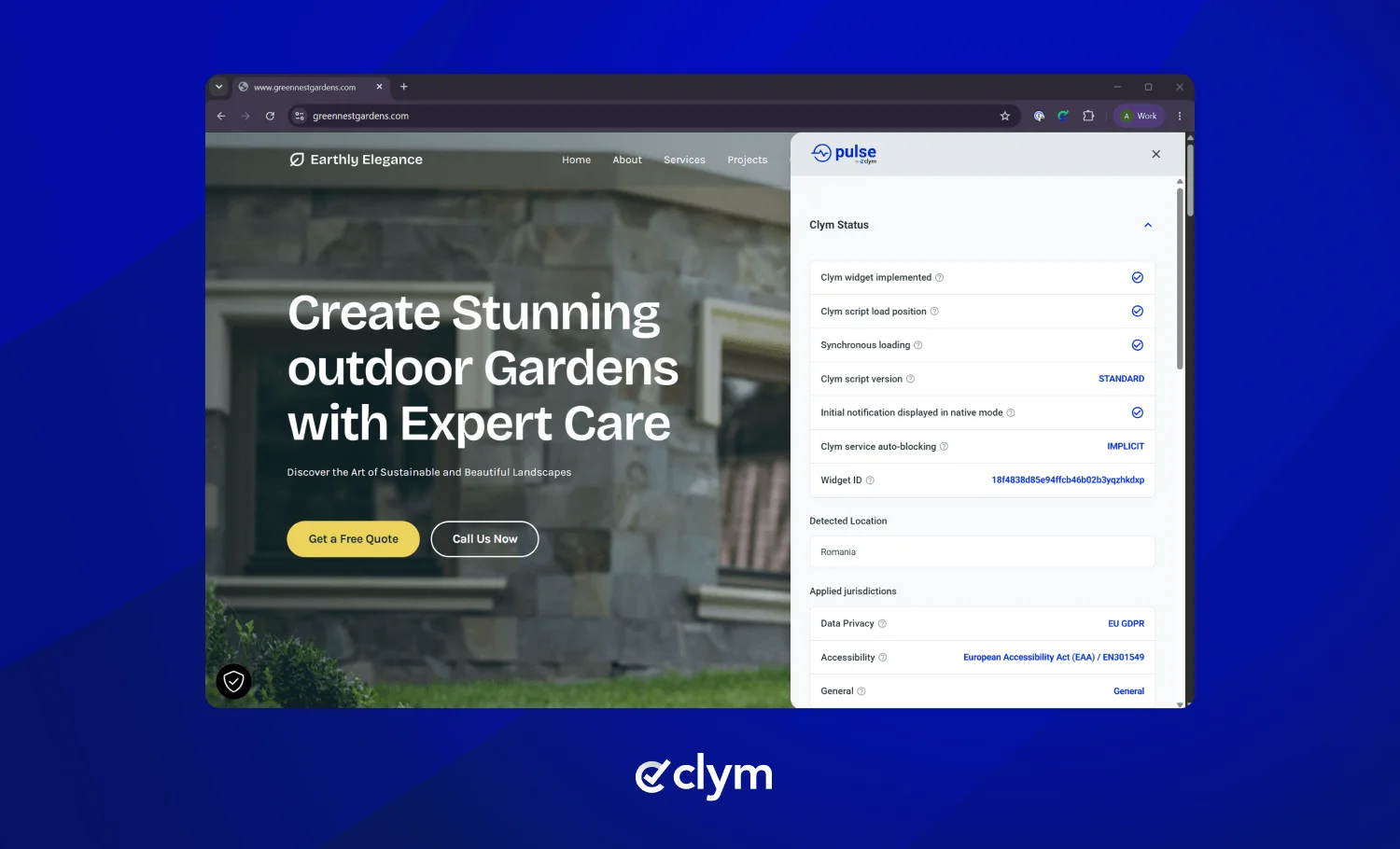
Clym’s free Pulse Chrome extension works on any website, with any CMP and without an account. Open it before touching the banner, and it shows whether Consent Mode v2 is detected, the default consent state, the location the website detected for you, and which services are Active or Blocked. Then accept or reject and watch the signals change. If advertising signals stay denied after you click Accept, something needs fixing.
Google Tag Assistant helps you check whether Consent Mode is configured correctly. Connect it to your website and review the earliest Consent event to inspect the default settings for the four signals. Then interact with your consent banner and check whether the signals update according to your choices. Use the Tags tab to review which Google tags fired or were blocked. In basic mode, some information may only become available after consent is granted.
Go to Goals > Conversions > Summary, select a website conversion action and open the Diagnostics tab. "Consent mode is implemented" means Google is receiving your signals. It doesn’t mean modeling is running: that only shows as "modeling is active" once your account reaches Google’s eligibility thresholds. The status can take 48 hours to appear, and up to two weeks in some cases.
Consent Mode v2 only works if the signals match what visitors chose. Choose basic or advanced mode deliberately, let a CMP like Clym keep the signals in sync, and check them with Pulse, Tag Assistant and Google Ads whenever your setup changes.
This article is for general information and is not legal advice. For advice on your specific situation, consult a qualified privacy lawyer.
It’s a Google requirement, not a legal one. Google requires consent signals from advertisers that use its ads and measurement features with visitors in the EEA, the UK and Switzerland. The GDPR itself doesn’t mention Consent Mode.
Yes. Google Consent Mode v2 can be implemented manually using Google’s tagging tools, as Google’s developer guide explains. However, a CMP can simplify consent collection and signal management, particularly for websites that use multiple Google services.
Publishers that earn revenue through AdSense, Ad Manager or AdMob must use a Google-certified CMP that integrates with the IAB TCF to serve personalized ads in the EEA, the UK and Switzerland. Advertisers who only send Consent Mode signals don’t need one. This certification is separate from Google’s CMP Partner Program for Consent Mode.
Google Consent Mode v2 is particularly important when using Google’s advertising features for visitors in the EEA, the UK or Switzerland. If you only use GA4 for analytics, you still need to respect applicable consent requirements. Consent Mode provides a way to communicate those choices to Google tags. If you use GA4 data for Google Ads features, the additional advertising consent signals become especially relevant. See is Google Analytics GDPR compliant?
No. It’s Microsoft’s own framework for Microsoft Advertising and Clarity tags, built on the same idea. Clym supports Microsoft Consent Mode too, so one banner can send signals to both.

Compliance Officer
Compliance Officer | CIPP/E (IAPP) | CPACC (IAAP)
Alex is a Compliance Officer and Content Developer at Clym, where he researches and writes about everything related to data privacy and web accessibility compliance for businesses, helping them stay informed on their compliance needs and spreading awareness about making the web safer and more inclusive. When he's not writing about compliance, Alex has his nose in a book or is hiking in the great outdoors.